
2006-08-01 14:59:23
Chapter 9: Source Control Integration with IDEs
This is part of an online book called Source Control HOWTO, a best practices guide on source control, version control, and configuration management.
| < Chapter 8 |
Background: What is an IDE?
The various applications used by software developers are traditionally called "tools". When we speak of "developer tools", we're talking about the essential items that programmers use every day, like compilers and text editors and syntax checkers and Mountain Dew. Just as a master carpenter uses her tools to build a house, developers use their tools to build software applications.
In the old days, each developer would assemble their own collection of their favorite tools. Back around 1991, my preferred toolset looked something like this:
- gcc (for compiling source code)
- gdb (for debugging)
- make (for managing builds)
- rcs (for managing versions)
- emacs (for editing source code)
- vi (for editing the emacs makefile)
Fifteen years later, most developers would consider this approach to be strange. Today, everything is "integrated". Instead of selecting one of each kind of tool, we select an Integrated Development Environment (IDE), an application which collects all the necessary tools together in one place. To continue the metaphor, we would say that the focus today is not on the individual tools, but rather, on the workshop in which those tools are used.
This trend is hardly new. Ever since Borland released Turbo Pascal in 1983, IDEs have become more popular every year. In the last ten years, many IDE products have disappeared as the industry has consolidated. Today, it is only a small exaggeration to say that there are just two IDEs left: Visual Studio and Eclipse.
But despite the industry consolidation, the trend is clear. Developers want their tools to be very well integrated together. Most recently, Microsoft's Visual Studio Team System takes this trend to a higher level than we have previously seen. Mainstream IDEs in the past have provided base operations such as editing, compiling, building and documentation. Now Visual Studio also has unit tests, visual modeling, code generators, and work item tracking. Furthermore, the IDE isn't just for coders anymore. Every task performed by every person involved in the software development process is moving into the IDE.
Benefits of source control integration with IDEs
Source control is one of the development tools which has been commonly integrated into IDEs for quite some time. The fit is very natural. Here at SourceGear, our source control product has two main client applications:
- A standalone client application which is specifically designed to talk with the source control server.
- A client plugin which adds source control features into Visual Studio.
Unsurprisingly, the IDE client is very popular with our users. Many of our users would never think about using source control without IDE integration.
Why does version control work so nicely inside an IDE? Because it makes the three most common operations a lot easier:
Checkout
When using the checkout-edit-checkin model, files must be checked out before they are edited. With source control integrated into an IDE, this task can be quite automatic. Specifically, when you begin to edit a file, the IDE will notice that you do not have it checked out yet and check the file out for you. Effectively, this means developers never need to remember to checkout a file.
Add
A common and frustrating mistake is to add a new file to a project but forget to place it under source control. So when I am done with my coding task, I checkin my changes to the existing files, but the newly added file never makes it into the repository. The build is broken.
When using source control integration with an IDE, this mistake is basically impossible to make. Most IDEs today support the notion of a "project", a list of all files which are considered part of the build process. When used with source control, the IDE decides what files to place under source control because it knows every file that is part of the project. The act of adding a file to the project also adds it to source control.
Checkin
IDEs excel at nagging developers. The user interface of an IDE has special places to nag the developer about compiler errors and unsaved files and even unfixed bugs. Similarly, visual indicators in the IDE can be used to remind the developer that he has not yet checked in his changes.
When source control is integrated into an IDE, developers don't have to think about it very much. They don't have to try to remember to Checkout, Add or Checkin because the IDE is either performing those actions automatically or reminding them to do it.
Bigger benefits
Once you integrate source control into an IDE, you open the possibility for cool features that go beyond the basics. For example, source control integration can be incredibly helpful when used with refactoring. When I use the refactoring features of Eclipse to rename a Java class, it is obviously nice that Eclipse figures out all the changes that need to be made. It's even nicer that Eclipse automatically handles all the necessary source control operations. It even performs the name change of the source file.
For another example, here is a screen shot of a Blame feature integrated into Eclipse:
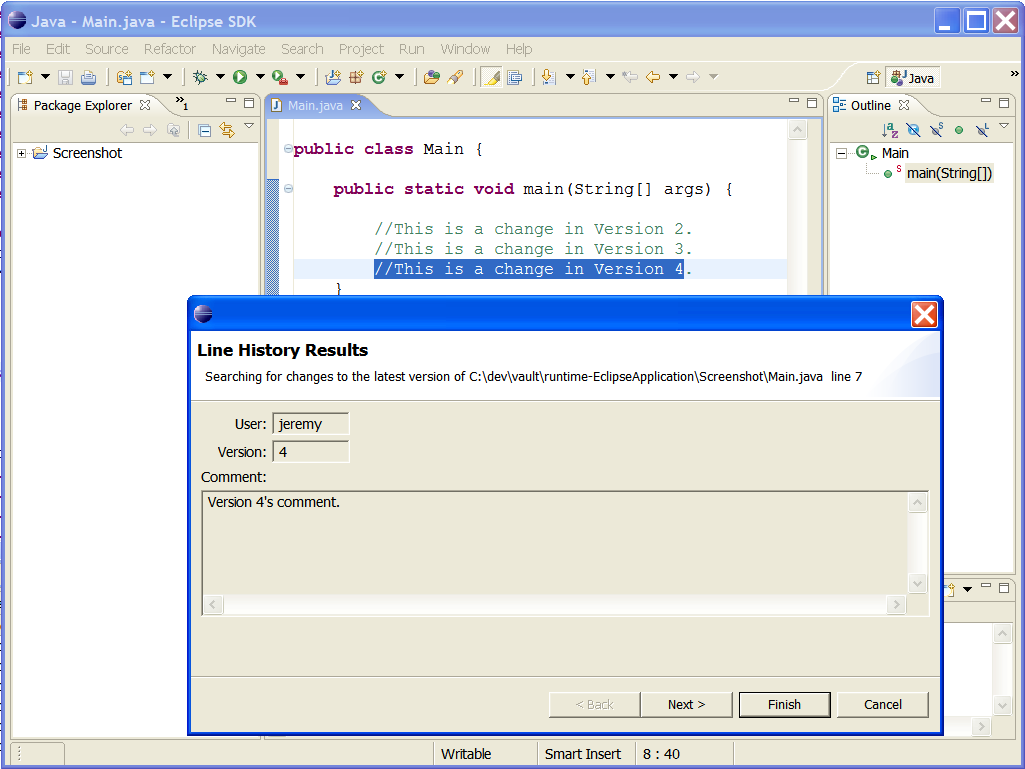
The user story for this feature goes like this: The developer is coding and she encounters something that deserves to be on The Daily WTF. She wants to immediately know who is responsible, so she right-clicks on the offensive line and selects the Blame feature. The source control plugin queries the repository for history and determines who made the change. The task was simpler because the Blame feature is conveniently located in the place where it is most likely to be needed.
Tradeoffs and Problems
For source control, IDE integration is great in theory, but it has not always been so great in practice. The tradeoffs of having your IDE do source control for you are the same as the tradeoffs of having your IDE do anything else. It's easier, but you have less control over the process.
Before I continue, I need to make a confession:
I personally have never used source control integration with an IDE. Heck, for a long time I didn't use IDEs at all. I'm a control freak. It's not enough for me to know what's going on under the hood. Sometimes I prefer to just do everything myself. I don't like project-based build systems where I add a few files and the IDE magically builds my app. I like diving make systems where I can control exactly where everything is and where the build targets are placed.
Except for a brief and passionate affair with Think C during the late eighties, I didn't really start using IDE project files until Visual Studio .NET. Today, I am gradually becoming more and more of an IDE user, but I still prefer to do all source control operations using a standalone GUI client. Eventually, that will change, and my transformation to IDE user will be complete.
Anyway, for the sake of completeness, I will explain the tradeoffs I see with using source control integration with IDEs. This should be taken as information, not as an argument against the feature. IDE integration is the most natural way to use source control on a daily basis.
The first observation is that IDE clients have fewer features than standalone clients. The IDE is great for basic source control operations, but it is definitely not the natural place to perform all source control operations. Some things, such as branching, don't fit very well at all. However, this is a minor point which merely illustrates that an IDE client cannot be the only user interface for accessing a source control repository. If this were the only problem, it would not be a problem. This is the sort of tradeoff that I would consciously accept.
The real problem with source control integration for IDEs is that it just doesn't work very well. For this sad state of affairs, I put most of the blame on MSSCCI.
MSSCCI
It's pronounced "misskee", and it stands for Microsoft Source Code Control Interface. MSSCCI is the API which defines the interaction between Microsoft Visual Studio and source control tools.
A source control tool which wants to support integration with Visual Studio must implement this API. Basically, it's a DLL which defines a number of documented entry points. When configured properly, the IDE makes calls into the DLL to perform source control operations as needed or as requested by the user.
Originally, Microsoft's developer tools were the only host environments for MSSCCI. Today, MSSCCI is used by lots of other IDEs as well. It has become sort of a de facto standard. Source control vendors implemented MSSCCI plugins so that their products could be used within Microsoft IDEs. In turn, vendors of other IDEs implemented MSSCCI hosting so that their products could be used with the already-available source control plugins.
The ubiquity of MSSCCI is very unfortunate. MSSCCI was designed to be a bridge between SourceSafe and early versions of Microsoft Visual Studio. It served this purpose just fine, but now the API is being used for lots of other version control tools besides SourceSafe and lots of other IDEs besides Visual Studio. It is being used in ways that it was never designed to be used, resulting in lots of frustration.
The top three problems with MSSCCI are:
- Poor performance. SourceSafe has no support for networking, but the architecture of most modern version control tools involves a client and a server with TCP in between. To get excellent performance from a client-server application, careful attention must be paid to the way the networking is done. Things like threading and blocking and buffering are very important. Unfortunately, MSSCCI makes this rather difficult.
- No Edit-Merge-Commit. SourceSafe is basically built around the Checkout-Edit-Checkin approach, so that's how MSSCCI works. Building a satisfactory MSSCCI plugin for the Edit-Merge-Commit paradigm is very difficult.
- No Atomic transactions. SourceSafe has no support for atomic transactions, so MSSCCI and Visual Studio were not designed to use them. This means that sometimes modern version control tools like Vault can't group things together properly at commit time.
On top of all this, all the world's MSSCCI hosts tend to implement their side of the API a little differently. If you implement a MSSCCI plugin and get everything working with Visual Studio 2003, you have approximately zero chance of it working well with Visual Basic 6, FoxPro or Visual Interdev. After you code in all the special hacks to get things compatible with these fringe Microsoft environments, your plugin still has no real chance of working with third party products like MultiEdit. Every IDE requires some different tweaks and quirky behavior to make it work. By the time you get your plugin working with some of these other IDEs, your regression testing shows that it doesn't work with Visual Studio 2003 anymore. Lather. Rinse. Repeat.
Most developers who work with MSSCCI eventually turn to recreational pharmaceuticals in a futile effort to cope.
A brighter future
Luckily, MSSCCI is fading away. Earlier in this article I flippantly joked that Visual Studio and Eclipse were the only IDEs left in the world. This is of course an exaggeration, but the fact remains that these two products have the lion's share, so we can take some comfort in their dominance when we think about the prevalence of MSSCCI in the future:
- Eclipse does not use MSSCCI. It has its own source control integration APIs.
- Visual Studio 2005 introduced a new and greatly improved API for source control integration.
So, the two dominant IDEs today inspire us to dream of a MSSCCI-free world. The planet will certainly be a nicer place to live when MSSCCI is a distant memory.
Here at SourceGear, the various problems with MSSCCI have caused us to hold a cautious and reserved stance toward IDE integration. Most of our customers really would prefer an IDE client, so we give them one. But we consider our standalone GUI client to be the primary UI because it is faster and more full-featured. And internally, most of us on the Vault team use the standalone GUI client for our everyday work.
But our posture is changing dramatically. We are currently working on an Eclipse plugin as well as a completely new plugin for the new source control API in Visual Studio 2005. Sometime in early 2007, we will be ready to consider our IDE clients to be primary, with our other client applications to be available for less common operations. What do I mean when I say "primary"? Well, among other things, I mean that the IDE clients will be the way we use our own product. Including me. :-)
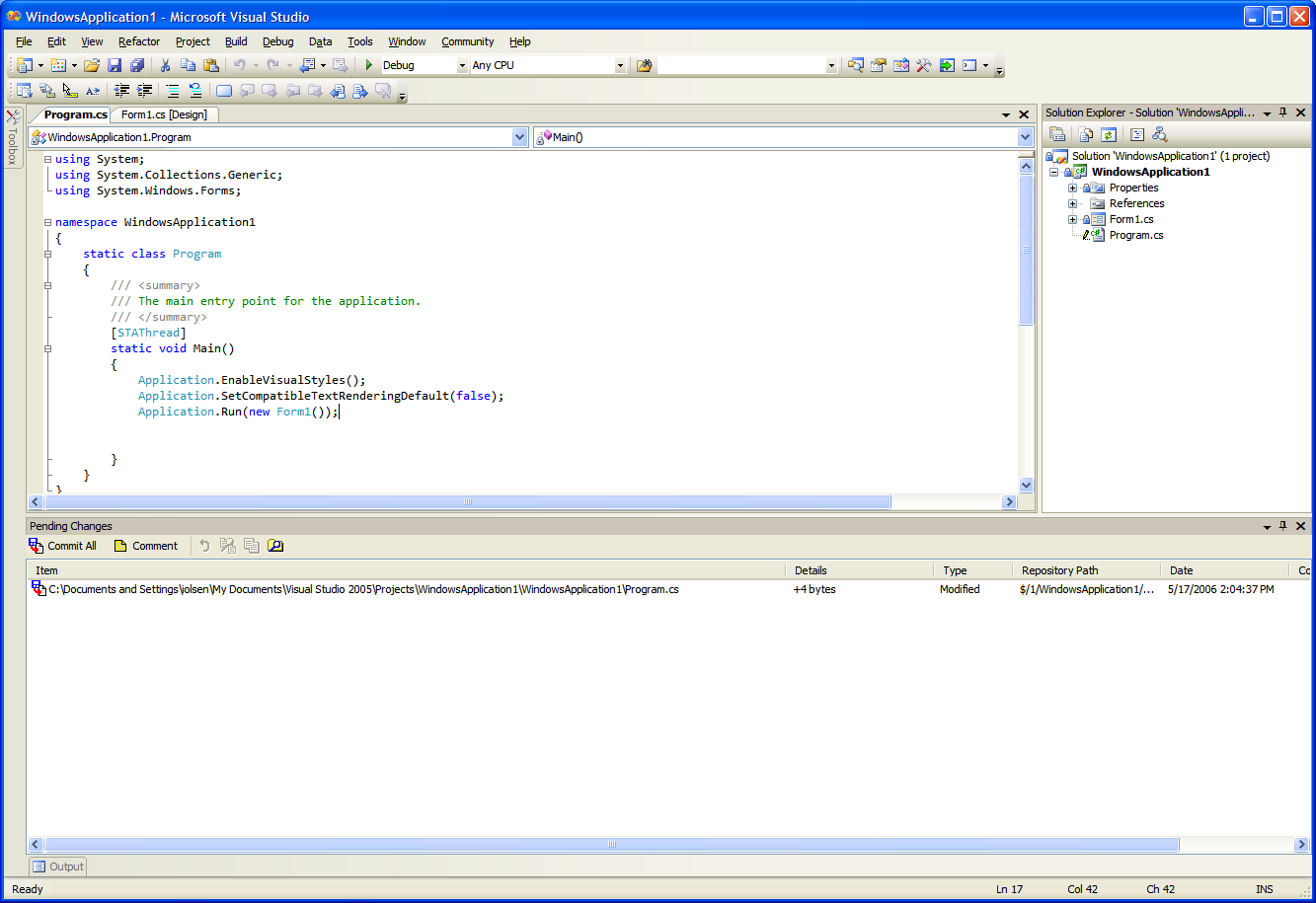
It's not yet terribly impressive to look at, but here's a screen shot of our new Visual Studio 2005 client:
Final thoughts
The direction of this industry right now is toward more and more integration. This is a very good thing. We're going to see many new improvements. Users will be happier. Just as a spice rack belongs near the stove, source control should always be available where the developer is working.
| < Chapter 8 |