
2007-07-17 13:00:00
5: It's All About Triangles
This entry is part 5 of a 12-part series on WPF 3D.
Back to Basics
After several posts about the quirky minutia of WPF 3D, now I want to go back and cover some basic principles for those who may be less familiar with 3D graphics. A full introduction would be far beyond the scope of a blog entry, so I'm just going to hit a few highlights I consider significant, especially for those who are coming from a background in 2D graphics.
Floating point
When I first started doing 3D graphics programming, I was surprised when I saw all the floating point numbers. If the pixel I want is at X=7, and the next pixel is at X=8, what the heck is at X=7.5?
When I learned 2D graphics on APIs like Win32, we worked with integers. In fact, we usually worked directly with pixels. Pixels are very discrete, so integers are the right way of dealing with them. We have X and Y coordinates. If we increase X by one, we have moved one pixel to the right. There is nothing in between. Life is simple that way. [Footnote 1]
In 3D graphics, coordinates are floating point numbers and pixels are abstracted away. We just don't think very much about pixels.
OK, so everything is in floating point. So if the units are not pixels, what are they? Inches? Centimeters? Miles?
Answer: It doesn't matter. The coordinate system of 3D graphics is unit-less. You can think of the units as whatever you want them to be, if in fact your 3D scene has physical dimensions at all. In my woodworking app, I set one unit equal to one inch.
Triangles
One of the next things I noticed when I started 3D graphics programming was all the triangles. Why does everything have to be about triangles? In woodworking, every board starts out with six sides that are flat and rectangular. Triangles sometimes happen in the woodshop, but not really all that often. Why can't I just tell the graphics system that I've got a six-sided rectangular solid?
Most things in the architecture of a computer system are built layer upon layer. The lower layers deal with the simplest concepts, the things from which all the more complicated things can be built. Assembly language is a very low-level layer. It is tedious, but ultimately quite powerful, as everything in software is built upon it.
Triangles are somewhat like the assembly language of 3D graphics.
- All triangles are convex. Computational geometry algorithms become much more complex when have to consider concave polygons.
- All triangles are planar. With only three points, you either have a degenerate triangle or you have a plane. No other cases can come up.
- Every polygon can be broken up into a set of triangles. We call this triangulation.
If computer graphics engines were built on any other fundamental item, none of these things would be true. For example, suppose we built the system on quadrilaterals. Now we have all kinds of problems. Given any four points, there may not be a plane which passes through all four of them. Even if they are coplanar, the resulting quad might not be convex. Furthermore, there are lots of polygons which cannot be broken up into quads.
In 3D graphics, including WPF 3D, everything is a triangle. In order to display a 3D scene, you have to break it all down into triangles.
Front and Back
The three points of a triangle determine a plane. [Footnote 2]. This makes it quite simple to determine, for any given point, which side of the triangle's plane the point is on. Why is this important? Because in 3D graphics, a triangle has a front and a back. The front of the triangle is drawn while the back is completely ignored. [Footnote 3]
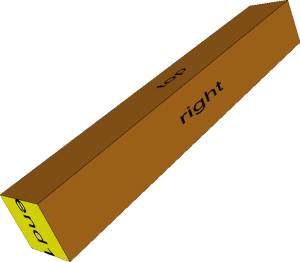 Consider the solid object in this picture. It has six
rectangular sides. Each side is drawn as two triangles.
Consider the solid object in this picture. It has six
rectangular sides. Each side is drawn as two triangles.
- Three of the sides (top, right and end1) are visible, so those six triangles are being drawn.
- The other three sides (bottom, left, and end2) are facing away from the camera. Those six triangles can be completely ignored.
Ignoring triangles can save a lot of rendering time in a complicated 3D scene. This simple drawing has only 12 triangles, but the full workbench picture (shown in entry 2 of this series) has 2,208 triangles, and that is still a very simple scene.
OK, so a triangle has a front and a back. Which side is the front?
We adopt a convention depending on the order of the vertices. On the front of the triangle, the vertices are specified in counter-clockwise order.
Summary
Most programmers don't code in assembly language, choosing instead to spend their day at a higher level of abstraction like C or Java. The same thing happens in 3D programming. Typically, you build a layer of abstraction so you don't have to spend your day working directly with triangles. In my solid modeling library, each face of a solid can be any kind of polygon. Since I already have the code to triangulate those polygons and stuff them into WPF, I actually don't think about triangles very often.
Still, I always find it helpful to understand what's going on "under the hood". You'll probably find WPF 3D programming easier when you grab these three first concepts:
- Vertices are 3D coordinates, floating point numbers, with no units.
- Everything is a triangle.
- On the front of the triangle, the vertices are listed counter-clockwise.
Footnotes
- Yes, WPF uses floating point numbers for 2D graphics as well.
- Degenerate triangles don't matter in this discussion.
- Actually WPF allows you to draw the back side of a triangle if you want. I don't have much use for this feature, but it's there.