
2007-11-21 17:00:47
From C# to Java: Part 2
As I mentioned in part 1, it has been almost ten years since I last wrote any real Java code. That was apparently long enough for me to repress some of the more painful memories. For example, I had completely forgotten about how the following code works:
String a = new
String("foo");
String b = new String("foo");
if (a == b)
{
// this will
never happen
}
In C#, when you use the == operator on strings, you get what you expect. In Java, == merely tells you if the two strings are the very same object, not whether the two strings are the same.
Tangent: Operator Overloading
More broadly, going back to Java makes me realize just how much I appreciate operator overloading in C#.
I'm not saying that I think operator overloading is really useful for my own classes. Mostly I think it's a way of empowering programmers to create bad code. I'll admit I use operator overloading just a little bit in Sawdust to support easy manipulation of 3D points and vectors, but I could live without it.
However, I really like the way operator overloading is used by the .NET Framework classes:
- Using == to compare strings is just very intuitive.
- It feels very natural to use < and > to compare DateTime objects.
- Indexing a Dictionary with [] just seems right.
None of these bits of syntax are available in Java, and I miss them all.
Especially for Strings.
But that's not the part that's upsetting.
You've Gotta be Kidding Me
What's really shocking is that I spent a week or so writing incorrect code and nothing in my development environment warned me. I didn't realize that == cannot be used for string comparison until I noticed my app giving incorrect results and starting digging to find out why. I would think that some sort of warning would have been appropriate.
And frankly, I'm just very surprised I didn't get one. I mean really -- it seems to me like Eclipse does an amazing job in the area of errors and warnings.
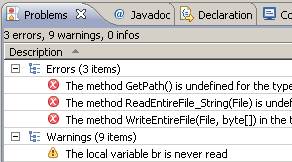 When I have a warning or an error, Eclipse shows it
to me in several different ways, none of which interrupt my work. The
Problems tab gives me a complete list. In the editor I get yellow or red
squigglies. In the margin I get icons on any line with an error. In the
Explorer view there are icon overlays to show which files have problems.
When I have a warning or an error, Eclipse shows it
to me in several different ways, none of which interrupt my work. The
Problems tab gives me a complete list. In the editor I get yellow or red
squigglies. In the margin I get icons on any line with an error. In the
Explorer view there are icon overlays to show which files have problems.
- When I'm typing the name of a new class, Eclipse checks
the name on every keystroke. It complains if my current entry is a name
that is used somewhere else. It gripes if the capitalization is
inconsistent with typical Java practices.
- Yesterday afternoon I opened my office window. Eclipse noticed, grabbed my IP address, used it to lookup my geographic location, checked the weather for Champaign, found rain in the forecast, and warned me to not forget to close my window before going home. :-)
Seriously, Eclipse is by far the chattiest development environment I have ever used, and that's not my complaint. I find Eclipse to be extremely pleasant. It warns me a lot, but its warnings are immediate, appropriate, and helpful.
And that's why I can't believe that no part of the Eclipse environment chose to warn me about the way I was comparing strings. My expectations had been set very high. Eclipse warns me so often that I find myself trying to sit with better posture just so I don't get fussed at. But for some reason, it silently accepts the use of == comparisons on Strings, even though such usage is almost always incorrect.
Bottom Line
I think I'll just end this rant here.
I regret that this entry is almost completely positive about C# and negative about Java. For the sake of balance, in part 3 I will focus on several areas where Eclipse is better than Visual Studio. Way better. :-)